Bowman War1.5.2
Publisher Description
*NOW FREE for a LIMITED TIME!*
DEVISE a STRATEGY and COMMAND YOUR TROOPS in BATTLE! ROUT the ENEMY and ASSERT your DOMINANCE!
PART THREE of the BOWMAN TRILOGY, following BOWMAN DEFENSE and BOWMAN ATTACK!
his army assembled, the king of the white country planned for the defense of his people against the treacherous reds
the king furnished his army with the best supplies and the latest in military technology.
brimming with confidence, the white army set sail to meet its foe
the days at sea mounted interminably supplies were running low
finally, the white army dropped anchor and set foot on red land. within moments, battle had begun
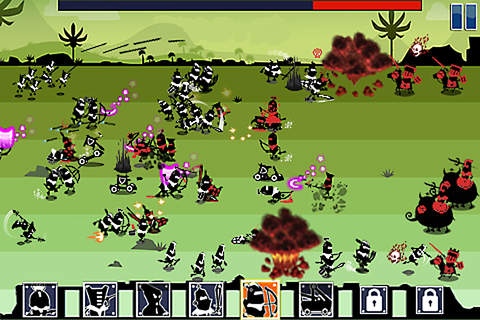
fast-paced castle defense
6 lanes of action-packed strategic warfare
timed super attacks
5 different areas and 30 individual levels
16 unique soldier classes
skills arena for earning extra gold
http://twitter.com/TRINITIgames
http://facebook.com/TRINITIgames
Requires iOS 3.0 or later. Compatible with iPhone, iPad, and iPod touch.
About Bowman War
The company that develops Bowman War is Triniti Interactive Limited. The latest version released by its developer is 1.5.2.
To install Bowman War on your iOS device, just click the green Continue To App button above to start the installation process. The app is listed on our website since 2010-08-05 and was downloaded 171 times. We have already checked if the download link is safe, however for your own protection we recommend that you scan the downloaded app with your antivirus. Your antivirus may detect the Bowman War as malware if the download link is broken.
How to install Bowman War on your iOS device:
- Click on the Continue To App button on our website. This will redirect you to the App Store.
- Once the Bowman War is shown in the iTunes listing of your iOS device, you can start its download and installation. Tap on the GET button to the right of the app to start downloading it.
- If you are not logged-in the iOS appstore app, you'll be prompted for your your Apple ID and/or password.
- After Bowman War is downloaded, you'll see an INSTALL button to the right. Tap on it to start the actual installation of the iOS app.
- Once installation is finished you can tap on the OPEN button to start it. Its icon will also be added to your device home screen.
